
Smart Home
Smart Home Devices
Creating a smart home can enhance your lifestyle with convenience, security, and efficiency.
Amazon offers a variety of smart devices that can be seamlessly integrated to transform your living space.
As an Amazon Associate I earn from qualifying purchases.
Before setting up your smart home, it’s important to choose the devices that best fit your needs. Here’s a list of popular Amazon smart devices and their uses:
| Product Image | Product Name | Description | Primary Button |
|---|---|---|---|
|
|
|
||
|
|
|
||
|
|
|
||
|
|
|
||
|
|
|
||
|
|
|
||
|
|
|
||
|
|
|
||
|
|
|
||
|
|
|

Features a screen for video calls, streaming video, and displaying information.

A compact version of the Echo, ideal for smaller spaces or extending Alexa capabilities throughout your home.

A smart speaker with Alexa, perfect for voice control, playing music, and managing other smart devices.
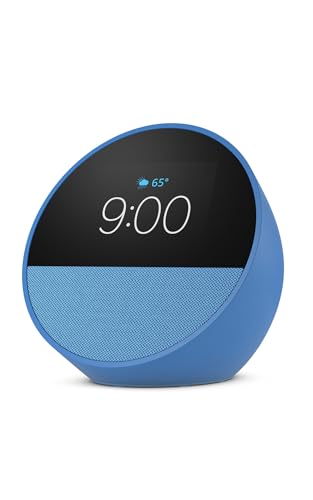
Great for nightstands, offices and kitchens, Smart alarm clock with Alexa.

A compact version of the Echo, ideal for smaller spaces or extending Alexa capabilities throughout your home.
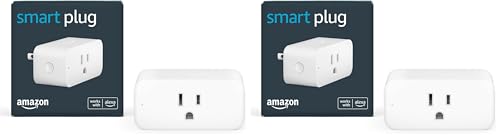
Allows you to control appliances with your voice or the Alexa app.

Transforms your TV into a smart TV, offering streaming services and integration with Alexa.

Enhances home security with video doorbells that work seamlessly with Alexa.

Provides home security with indoor and outdoor cameras that integrate with Alexa.

Blink is a popular home security system provider, offers subscription plans designed to enhance the security of your home while providing additional features for your peace of mind.
Setting Up Your Smart Home
Once you’ve selected your devices, follow these steps to set up your smart home:
1. Connect Your Devices
Download the Alexa App: Start by downloading the Alexa app on your smartphone or tablet. This app will be your central hub for managing all Amazon devices.
Set Up Your Echo Device: Plug in your Echo device and follow the app instructions to connect it to your Wi-Fi network.

Add Additional Devices: Use the Alexa app to discover and add other Amazon devices like the Echo Show, Smart Plugs, or Fire TV Stick. Simply go to “Devices” in the app and select “Add Device.”
2. Enhance Security
Install Blink Cameras and Ring Doorbell: Set up security cameras and video doorbells to monitor your home. Use the Alexa app to view live feeds and receive alerts when motion is detected.
Maintaining Your Smart Home
Regularly update your devices and software to ensure they are secure and function smoothly. Keep checking for new Alexa Skills and compatible devices to expand your smart home’s capabilities.
Enjoy the convenience and efficiency that comes with a well-integrated smart home!
You might also like Family Calendar
We are a participant in the Amazon Services, LLC Associates Program, an Affiliate Advertising Program designed to provide a means for us to earn fees by linking to Amazon.com and affiliated sites.
